

Anonymous chats with HR
Feedback process where insights can be quickly followed up and deepened.
Follow up on feedback
Anonymous dialogue – get answers to your feedback
Collecting feedback is only the first step. The real value comes when you can follow up and understand what lies behind the responses.
With anonymous chats in SimplyPulse, HR can ask follow-up questions directly on free-text responses—without revealing the employee's identity. This makes it possible to deepen the dialogue and gain more concrete insights, while maintaining anonymity.
Step by step
How anonymous chats work
1. An employee provides a free-text response in a survey.
There are two types of questions in pulse surveys and eNPS in SimplyPulse:
- Scale (1–5) where the administrator can choose to allow the respondent to leave a comment on their answer.
- Free text questions where the answer is always written as free text.
Anonymous chats can be used for both types. HR can therefore respond to comments submitted to a scale question or to answers submitted in a free text question.
2. HR asks a follow-up question
HR can respond to the comment and ask for clarification. For example:
- “Can you tell me a little more about what makes the workload high?”
- “Do you have any suggestions on how this could be improved?”
The dialogue takes place in an anonymous chat linked to the response.
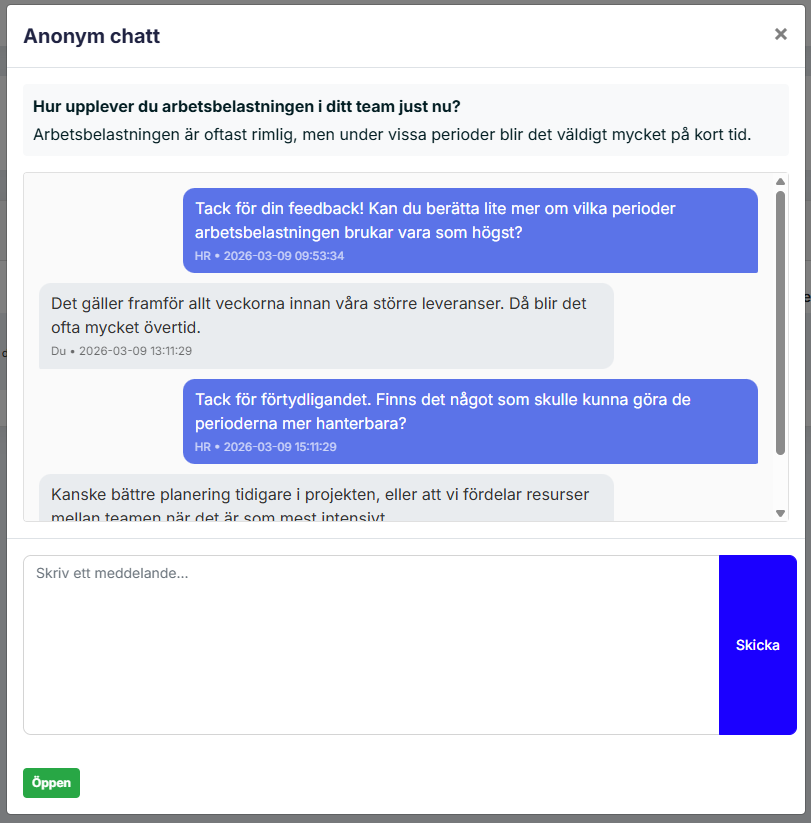
3. The employee responds – completely anonymously
The employee can continue the dialogue via a secure chat.
HR can never see:
- name
- user account
The only thing visible is the conversation itself.
The advantages
Why anonymous dialogue is valuable
Understand what lies behind the answers
Get more concrete suggestions for improvement
Build trust
Focus on integrity
Full control over anonymity
SimplyPulse is designed to protect employee anonymity.
- HR can never see who wrote the comment.
- the dialogue takes place via anonymous links
- No personal information is displayed in the chat.
This allows the organization to have an open dialogue without compromising anonymity.
Want to know more or get started with SimplyPulse?
Fill in your contact details and we will get back to you!
You can also reach us at info@simplypulse.io